
The Secret Weapon Every .NET Engineer Must Know: CancellationToken Deep-Dive!
Summary
Long-running API tasks may keep running even if the client disconnects, cancels, times out, or loses connection—wasting server resources.
Understanding Cooperative Cancellation in .NET Core
ASP.NET Core Integration, Stateless REST Behavior & Full Request Lifecycle Flow
Modern applications frequently run long operations:
Database queries
File uploads and downloads
External API calls
Large report generation
Data streaming
Background processing
But what happens when:
the user closes the browser?
the client cancels the request?
the device loses connectivity?
a reverse proxy aborts the request?
the request times out?
the server begins shutting down?
If your API keeps working after the client is gone, you are wasting:
CPU
memory
thread pool workers
database connections
To solve this, .NET provides CancellationToken — a mechanism for cooperative, graceful cancellation of asynchronous operations.
How Cancellation Works in a Stateless REST API
REST is stateless — meaning:
The server does not remember any client state between requests.
Every incoming HTTP request is treated as a fresh, independent operation.
❓So how can a CancellationToken detect a cancelled request if REST is stateless?
Here’s the key:
REST is stateless
But
❗ each individual request still has its own lifecycle
A request begins when it arrives and ends when:
a response is returned
the client disconnects
the request times out
the server shuts down
This is perfectly valid in REST because:
no state is stored between requests
the lifecycle exists only during the request
once finished, the server forgets everything
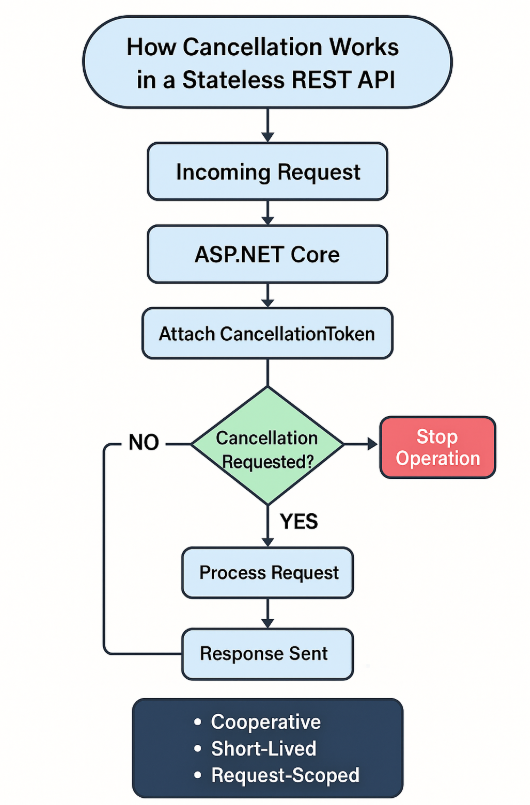
Where CancellationToken Fits In
ASP.NET Core creates a CancellationTokenSource for each incoming request.
This token belongs only to that single request, not to the user or session.
This means:
The server does not store any long-term token state
The token dies immediately when the request ends
The server does not remember previous cancellation signals
So cancellation fully complies with REST design.
Why This Works
✔ CancellationToken is short-lived
Attached only to the request currently being processed.
✔ No state is persisted
When the request ends, the token is gone.
✔ Cancellation is internal
It affects only the code executing inside the request pipeline.
✔ No REST violation
REST forbids saving client state between requests —
not managing state during the active request.
What Exactly Is a CancellationToken?
A CancellationToken is a lightweight, thread-safe signal that allows async code to detect when it should stop working.
It is not a forced kill signal.
It is cooperative:
The token receives a cancellation request
Your code checks for the request
Your code stops gracefully
Two Core Components
1) CancellationTokenSource
The signal generator — sends the “cancel now” request.
Responsible for:
Cancel()→ immediate cancellationCancelAfter()→ cancel after timeout.Token→ create aCancellationToken
Example:
var cts = new CancellationTokenSource();
cts.Cancel(); // sends cancel signal
2) CancellationToken
The signal listener — used by long-running tasks.
Common checks:
token.IsCancellationRequested
token.ThrowIfCancellationRequested()
Example:
for (int i = 0; i < 10; i++)
{
    token.ThrowIfCancellationRequested();
    await Task.Delay(1000, token);
}
CancellationToken in Action — Practical API Example
Controller
[HttpGet("long-task")]
public async Task<IActionResult> PerformTask(CancellationToken ct)
{
    try
    {
        await _service.DoWorkAsync(ct);
        return Ok("Task completed.");
    }
    catch (OperationCanceledException)
    {
        return StatusCode(499, "Client cancelled the request.");
    }
}
Service
public async Task DoWorkAsync(CancellationToken token)
{
    for (int i = 0; i < 10; i++)
    {
        token.ThrowIfCancellationRequested();
        await Task.Delay(1000, token);
        Console.WriteLine($"Step {i + 1} done");
    }
}
If the client closes the page after 2 seconds →
ASP.NET Core cancels the token →
your method stops immediately.
What Exactly Cancels the Token Inside ASP.NET Core?
ASP.NET Core binds a CancellationTokenSource to the request.
The token is cancelled when:
the client disconnects (TCP close event)
Kestrel detects connection abort
request body read timeout occurs
proxy aborts the request
server shutdown begins
app stops or restarts
The token is exposed via:
HttpContext.RequestAborted
Internally, ASP.NET Core triggers:
RequestAborted.Cancel();
That’s when your token receives the signal.
Simplified Request Pipeline Diagram
Client → Kestrel → Middleware → MVC Routing → Controller → Your Service
              │
              └── Creates CancellationToken (RequestAborted)
Cancellation Flow When the Client Disconnects
Client Disconnects
       ↓
Kestrel detects connection abort
       ↓
CancellationTokenSource.Cancel()
       ↓
Your code sees token cancellation
       ↓
OperationCanceledException thrown
       ↓
Graceful cleanup + 499 response
Detailed Internal Flow Diagram
┌───────────────────────────────┐
│         Client Sends Request   │
└──────────────┬────────────────┘
               ▼
   ┌────────────────────────────┐
   │       Kestrel Server       │
   │ Creates RequestAborted CTS │
   └────────────┬───────────────┘
                ▼
   ┌────────────────────────────┐
   │     Middleware Pipeline    │
   │  (Logging, Auth, Routing)  │
   └────────────┬───────────────┘
                ▼
   ┌────────────────────────────┐
   │   MVC Controller Invoked   │
   │  Token passed to action    │
   └────────────┬───────────────┘
                ▼
   ┌────────────────────────────┐
   │     Your async method      │
   │  checks token regularly    │
   └────────────┬───────────────┘
                ▼
If client disconnects / timeout:
                ▼
   Kestrel triggers Cancel()
                ▼
Your code throws OperationCanceledException
                ▼
Cleanup + return 499
Real-World Benefits
✔ Saves CPU and memory
Stops unnecessary work immediately.
✔ Frees threads
Critical under high traffic.
✔ Prevents database overload
Cancels expensive SQL queries early.
✔ Improves scalability
Server handles more concurrent requests.
✔ Enables graceful shutdown
Background workers stop safely.
Best Practices for Using CancellationToken
✔ Always accept CancellationToken in async APIs
public async Task<IActionResult> Get(CancellationToken ct)
✔ Pass the token down the stack
EF Core
HttpClient
Task.Delay
Streams
File I/O
✔ Use cancellation inside loops
token.ThrowIfCancellationRequested();
✔ Handle OperationCanceledException only once
Preferably in controller or middleware.
✔ Use cancellation in background services
Shutdown becomes graceful.