.NET 11 Preview: Top 10 Features Developers Should Know
Summary
.NET 11 Preview 1–4 brings C# union types, Process APIs, Zstandard, JSON updates, ASP.NET Core, Blazor, EF Core, and AI features which improve developer experience.
.NET 11 has moved quickly across its first four preview releases: Preview 1 shipped on February 10, 2026, Preview 2 on March 10, 2026, Preview 3 on April 14, 2026, and Preview 4 on May 12, 2026. Preview 5 will ship on approximate date June 10, 2026, Across these releases, Microsoft has been adding changes in the runtime, SDK, libraries, C#, ASP.NET Core, Blazor, .NET MAUI, EF Core, and developer tooling.
.NET 11 Preview 1–4: The features developers should care about most
.NET 11 previews focus on three big themes: runtime performance, better developer tooling, and practical framework/library additions that reduce boilerplate or unblock modern workloads.
1. C# 15 union types: safer return values and exhaustive pattern matching
One of the biggest language features in the .NET 11 preview wave is C# 15 union types. Starting in .NET 11 Preview 2, C# introduces the union keyword, which lets a value be exactly one of a closed set of types. The compiler can then check that your switch expressions handle every possible case.
Example: API result without throwing for normal cases
public record Success<T>(T Value);
public record NotFound(string Resource);
public record ValidationError(string Message);
public union ApiResult<T>(Success<T>, NotFound, ValidationError);
ApiResult<Customer> GetCustomer(int id)
{
    if (id <= 0)
        return new ValidationError("Customer id must be positive.");
    var customer = FindCustomer(id);
    return customer is null
        ? new NotFound($"Customer {id}")
        : new Success<Customer>(customer);
}
string ToHttpMessage(ApiResult<Customer> result) => result switch
{
    Success<Customer> ok => $"200 OK: {ok.Value.Name}",
    NotFound missing => $"404 Not Found: {missing.Resource}",
    ValidationError error => $"400 Bad Request: {error.Message}"
};
Source: Union Type Support
2. Major System.Diagnostics.Process API expansion
.NET 11 Preview 4 includes what Microsoft calls the biggest update to System.Diagnostics.Process in years. The new APIs simplify common process work: run a command, capture stdout/stderr, avoid pipe deadlocks, manage child lifetime, control inherited handles, and use lower-level SafeProcessHandle APIs when needed.

Example: run a process and capture output safely
using System.Diagnostics;
ProcessTextOutput result = await Process.RunAndCaptureTextAsync(
    "git",
    ["status", "--porcelain"]);
if (result.ExitStatus.ExitCode == 0)
{
    Console.WriteLine("Git status:");
    Console.WriteLine(result.StandardOutput);
}
else
{
    Console.Error.WriteLine(result.StandardError);
}
Before this, many developers manually created ProcessStartInfo, enabled redirection, subscribed to output events, started the process, read both streams, and waited for exit. That code was easy to get wrong, especially when stdout and stderr filled pipe buffers. The new RunAndCaptureText / RunAndCaptureTextAsync methods combine start, capture, and wait in one API.
Example: fire-and-forget process
using System.Diagnostics;
int pid = Process.StartAndForget("notepad.exe");
Console.WriteLine($"Started process {pid}");
StartAndForget exists because disposing a Process object does not kill the underlying process; it only releases resources. The new API starts the process, returns the ID, and releases the framework resources for you.
Example: kill child process when parent exits
using System.Diagnostics;
var psi = new ProcessStartInfo("worker.exe")
{
    KillOnParentExit = true
};
using Process child = Process.Start(psi)!;
KillOnParentExit is designed to prevent orphaned worker processes if the parent exits, crashes, or is force-terminated. Preview notes show Windows support in Preview 4, with Linux/Android noted for Preview 5 in the deeper Process article.
Source: Process Api Improvements in .NET 11
3. Zstandard compression and a broader modern compression stack
.NET 11 Preview 1 adds native Zstandard, or zstd, compression support through ZstandardStream, ZstandardEncoder, and ZstandardDecoder. The release notes describe zstd as significantly faster for compression and decompression while maintaining competitive compression ratios, and include benchmark claims of 2–7× faster compression at optimal level and 2–14× faster decompression at fastest level versus Brotli/Deflate in the tested workloads.
Example: compress and decompress with ZstandardStream
using System.IO.Compression;
// Compress
await using (var input = File.OpenRead("large-log.json"))
await using (var output = File.Create("large-log.json.zst"))
await using (var zstd = new ZstandardStream(output, CompressionMode.Compress))
{
    await input.CopyToAsync(zstd);
}
// Decompress
await using (var input = File.OpenRead("large-log.json.zst"))
await using (var output = File.Create("large-log.restored.json"))
await using (var zstd = new ZstandardStream(input, CompressionMode.Decompress))
{
    await zstd.CopyToAsync(output);
}
Preview 1 also adds HTTP automatic decompression support for Zstandard through DecompressionMethods.Zstandard.
using System.Net;
using System.Net.Http;
var handler = new HttpClientHandler
{
    AutomaticDecompression =
        DecompressionMethods.GZip |
        DecompressionMethods.Brotli |
        DecompressionMethods.Zstandard
};
using var client = new HttpClient(handler);
string payload = await client.GetStringAsync("https://api.example.com/data");
Preview 3 moved the Zstandard APIs into System.IO.Compression, aligning them with DeflateStream, GZipStream, and BrotliStream. Preview 4 then adds span-based Deflate, ZLib, and GZip encoder/decoder APIs, useful when you already operate on buffers and want to avoid stream allocation.
Example: span-based ZLib compression
using System.Buffers;
using System.IO.Compression;
ReadOnlySpan<byte> source = File.ReadAllBytes("payload.bin");
Span<byte> destination = new byte[source.Length * 2];
using ZLibEncoder encoder = new();
OperationStatus status = encoder.Compress(
    source,
    destination,
    out int bytesConsumed,
    out int bytesWritten,
    isFinalBlock: true);
Console.WriteLine($"Compressed {bytesConsumed} bytes into {bytesWritten} bytes.");
For web APIs, log shippers, message brokers, telemetry agents, and file processing systems, this compression work is one of the most useful library improvements in the early previews.
Source: Zstandard Compression
4. System.Text.Json improvements: metadata, naming, ignore rules, source generation, and F# unions
System.Text.Json gets improvements across multiple previews. Preview 2 adds generic GetTypeInfo<T>() and TryGetTypeInfo<T>() methods on JsonSerializerOptions, removing a manual cast from the older non-generic GetTypeInfo(Type) API. This is especially relevant for source generation, NativeAOT, and polymorphic serialization scenarios.
Example: strongly typed JSON metadata
using System.Text.Json;
using System.Text.Json.Serialization.Metadata;

JsonSerializerOptions options = new(JsonSerializerDefaults.Web);

// Before .NET 11 Preview 2:
// var info = (JsonTypeInfo<Customer>)options.GetTypeInfo(typeof(Customer));

// New:
JsonTypeInfo<Customer> info = options.GetTypeInfo<Customer>();

if (options.TryGetTypeInfo<Order>(out JsonTypeInfo<Order>? orderInfo))
{
    Console.WriteLine($"Found metadata for {orderInfo.Type.Name}");
}
Preview 3 expands naming and ignore controls. It adds JsonNamingPolicy.PascalCase, [JsonNamingPolicy] on individual members, and type-level
using System.Text.Json;
using System.Text.Json.Serialization;

[JsonIgnore(Condition = JsonIgnoreCondition.WhenWritingNull)]
public sealed class EventData
{
    [JsonNamingPolicy(JsonKnownNamingPolicy.CamelCase)]
    public string EventName { get; set; } = "";

    public string? Notes { get; set; }
}

var options = new JsonSerializerOptions
{
    PropertyNamingPolicy = JsonNamingPolicy.PascalCase,
    WriteIndented = true
};

var json = JsonSerializer.Serialize(
    new EventData { EventName = "UserLoggedIn", Notes = null },
    options);

Console.WriteLine(json);Source: System.Text.Json improvements
5. Runtime async, JIT improvements, and performance changes without source-code changes
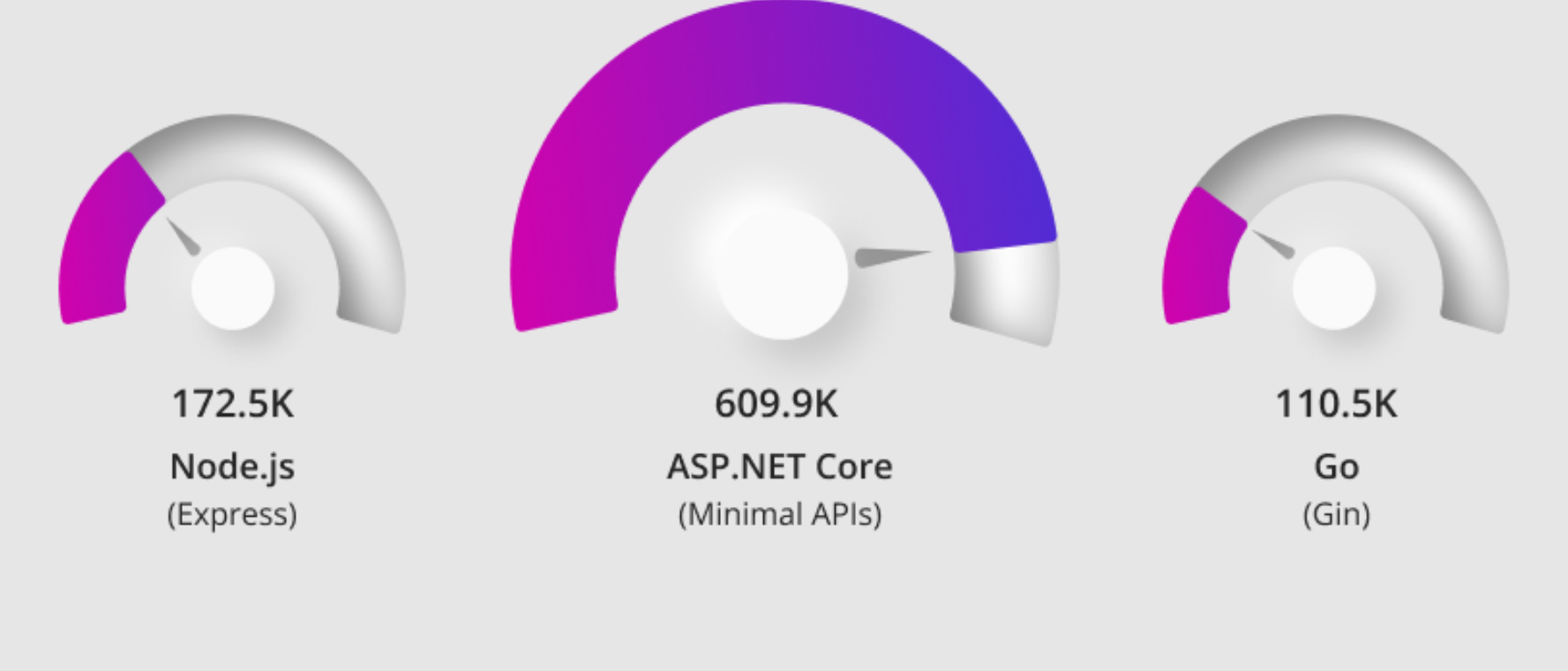
.NET 11 Preview 4 enables the runtime libraries to be compiled with runtime-async=on. That means the runtime libraries rely on the runtime-provided async implementation instead of compiler-generated async state machines. Microsoft says this is intended to bring throughput and library-size improvements, depending on the amount of async usage.
Example: ordinary async code benefits without changing syntax
app.MapGet("/orders/{id:int}", async (
    int id,
    OrderDbContext db,
    CancellationToken cancellationToken) =>
{
    Order? order = await db.Orders
        .Where(o => o.Id == id)
        .SingleOrDefaultAsync(cancellationToken);
    return order is null
        ? Results.NotFound()
        : Results.Ok(order);
});
Your code still uses async and await the same way. The important developer action is to benchmark real services and libraries under Preview 4+ if you have async-heavy workloads.
Preview 4 also includes several JIT improvements. Examples include constant folding for certain string.Equals / ReadOnlySpan<T>.SequenceEqual cases, bounds-check elimination after span.IsEmpty guards, redundant branch removal, faster Half conversions on x64 with F16C, better SIMD cost modeling, and faster vector dot-product lowering on AVX-capable x86.
Example: code pattern where the JIT can remove a bounds check
static bool StartsWithByte(ReadOnlySpan<byte> data, byte value)
{
    // Preview 4 notes say the JIT can now understand that
    // !data.IsEmpty proves data[0] is safe.
    return !data.IsEmpty && data[0] == value;
}Source:
6. SDK and CLI productivity: solution filters, file-based apps, dotnet run -e, and better watch
.NET 11 Preview 3 adds several developer workflow improvements to the SDK. The most useful are command-line editing of solution filters, multi-file support for file-based apps, environment variables passed directly through dotnet run -e, and improved dotnet watch behavior.
Example: create and edit a solution filter from CLI
dotnet new slnf --name MyApp.slnf
dotnet sln MyApp.slnf add src/App/App.csproj
dotnet sln MyApp.slnf add src/App.Tests/App.Tests.csproj
dotnet sln MyApp.slnf list
This is useful in large repositories where loading or building the entire solution is slow. You can keep the main solution intact while creating smaller .slnf files for focused work.
Example: split file-based apps across files
#:include helpers.cs
#:include models/customer.cs

Console.WriteLine(Helpers.FormatOutput(new Customer("Mihad")));
File-based apps are good for demos, scripts, experiments, and small tools. The new #:include directive makes that workflow more realistic because helper code can live in separate files without turning the script into a full project too early.
Example: pass environment variables directly to dotnet run
dotnet run \
  -e ASPNETCORE_ENVIRONMENT=Development \
  -e LOG_LEVEL=Debug
This avoids exporting shell variables or editing launch profiles for temporary local runs. Preview 3 notes also say the variables are available to MSBuild logic as RuntimeEnvironmentVariable items.
Source:
7. ASP.NET Core observability and OpenAPI improvements
Preview 2 adds native OpenTelemetry tracing for ASP.NET Core. ASP.NET Core now adds OpenTelemetry semantic-convention attributes to HTTP server activities by default, so you can subscribe to the Microsoft.AspNetCore activity source without adding the separate OpenTelemetry.Instrumentation.AspNetCore package for those framework-provided attributes.

Example: collect ASP.NET Core traces
using OpenTelemetry.Trace;

var builder = WebApplication.CreateBuilder(args);

builder.Services.AddOpenTelemetry()
    .WithTracing(tracing => tracing
        .AddSource("Microsoft.AspNetCore")
        .AddConsoleExporter());

var app = builder.Build();

app.MapGet("/", () => "Hello OpenTelemetry");

app.Run();
The Preview 2 release notes say attributes such as http.request.method, url.path, http.response.status_code, and server.address are populated on the request activity.
Preview 2 also adds OpenAPI 3.2.0 support through Microsoft.AspNetCore.OpenApi. Preview 4 builds on this by recognizing the proposed HTTP QUERY operation in generated OpenAPI documents. QUERY is intended for safe, idempotent search requests that need a body because the search expression is too large or structured for a URL.
Example: OpenAPI 3.2 with QUERY endpoint
using Microsoft.OpenApi;

var builder = WebApplication.CreateBuilder(args);

builder.Services.AddOpenApi(options =>
{
    options.OpenApiVersion = OpenApiSpecVersion.OpenApi3_2;
});

var app = builder.Build();

app.MapOpenApi();

app.MapMethods("/search", ["QUERY"], (SearchRequest request) =>
{
    return SearchService.Run(request);
});

app.Run();

public sealed record SearchRequest(string Text, string[] Tags);
Preview 4 also adds built-in OpenTelemetry-compatible metrics for MemoryCache, including cache requests, evictions, entries, and estimated size, with opt-in statistics tracking.
using Microsoft.Extensions.Caching.Memory;

builder.Services.AddMemoryCache(options =>
{
    options.TrackStatistics = true;
});Source:
8. Blazor and WebAssembly: TempData, Web Workers, Virtualize, service defaults, and circuit pause
Blazor receives several practical features across Preview 2 and Preview 4.
Preview 2 adds TempData support for Blazor SSR, useful for flash messages, POST-Redirect-GET flows, and one-time notifications. TempData is registered automatically when calling AddRazorComponents(), and the default cookie-based provider uses ASP.NET Core Data Protection.

Example: Blazor SSR TempData
@page "/profile"
@inject NavigationManager NavigationManager

<p>@_message</p>

<form @onsubmit="HandleSubmit">
    <button type="submit">Save profile</button>
</form>

@code {
    [CascadingParameter]
    public ITempData? TempData { get; set; }

    private string? _message;

    protected override void OnInitialized()
    {
        _message = TempData?.Get("Message") as string ?? "No message yet";
    }

    private void HandleSubmit()
    {
        TempData!["Message"] = "Profile saved successfully.";
        NavigationManager.NavigateTo("/profile", forceLoad: true);
    }
}
Preview 4 adds [SupplyParameterFromTempData], which lets a Blazor SSR component read and write TempData directly through a property.
@page "/account/manage"

<StatusMessage Message="@StatusMessage" />

@code {
    [SupplyParameterFromTempData]
    public string? StatusMessage { get; set; }
}
Preview 2 adds a .NET Web Worker template, and Preview 4 renames/updates it as the Blazor Web Worker template. The goal is to offload long-running work to a background thread so the UI remains responsive. Preview 4 also adds InvokeVoidAsync and cancellation/timeout support for worker creation and invocation.
dotnet new blazorwebworker -o MyApp.WorkerPreview 4 also improves Virtualize<TItem> so content above the viewport changing height does not cause visible content to jump. It adds AnchorMode for chat, log viewers, notification lists, and feeds where prepend/append behavior matters.
<Virtualize Items="@notifications"
            AnchorMode="VirtualizeAnchorMode.End"
            ItemComparer="@_notificationById">
    <ItemContent Context="item">
        <p>@item.Text</p>
    </ItemContent>
</Virtualize>

@code {
    private List<Notification> notifications = [];

    private static readonly IEqualityComparer<Notification> _notificationById =
        EqualityComparer<Notification>.Create(
            (a, b) => a?.Id == b?.Id,
            n => n.Id.GetHashCode());

    public sealed record Notification(int Id, string Text);
}
Blazor Server also gets a server-initiated circuit pause API, allowing operators to programmatically ask connected clients to begin a graceful pause flow during deployments or load-balancer rebalancing.
9. EF Core: vector search, JSON model integration, temporal columns, and dotnet-ef.json
EF Core in Preview 4 has several important database features. The most headline-worthy is approximate vector search for SQL Server 2025. EF Core can translate approximate nearest-neighbor vector queries through VectorSearch() and WithApproximate(), using SQL Server’s vector index support.
Example: approximate vector search
float[] queryVector = embeddingService.CreateEmbedding("best .NET preview features");

var matches = await context.Blogs
    .VectorSearch(b => b.Embedding, queryVector)
    .WithApproximate()
    .Take(10)
    .ToListAsync();
This matters for AI/RAG apps, semantic search, recommendations, document search, and similarity ranking. The release notes also say exact search is used without WithApproximate(), which is useful for checking recall on small datasets.
Preview 4 also makes JSON columns first-class citizens in the EF relational model. For most applications, existing OwnsOne / OwnsMany JSON mappings continue working, but internally EF now represents JSON paths structurally instead of building JSON path strings late during command generation. This improves diagnostics and reliability for partial updates, migrations, and compiled models.
Example: map temporal period properties
public class Order
{
    public int Id { get; set; }
    public string Status { get; set; } = "";

    public DateTime PeriodStart { get; set; }
    public DateTime PeriodEnd { get; set; }
}

protected override void OnModelCreating(ModelBuilder modelBuilder)
{
    modelBuilder.Entity<Order>().ToTable(tb => tb.IsTemporal(ttb =>
    {
        ttb.HasPeriodStart(o => o.PeriodStart);
        ttb.HasPeriodEnd(o => o.PeriodEnd);
    }));
}
The EF CLI also gets a productivity improvement: dotnet ef can read defaults from .config/dotnet-ef.json, so you do not need to repeatedly pass --project, --startup-project, or --context.
{
  "project": "src/App.Infrastructure",
  "startupProject": "src/App.Api",
  "context": "AppDbContext"
}
dotnet ef migrations add InitialCreate
dotnet ef database updateThat is a small feature, but it reduces friction in real multi-project solutions.
10. AI and numeric workloads: BFloat16, MCP server template, and better building blocks
.NET 11 Preview 1 adds System.Numerics.BFloat16, a 16-bit floating-point type widely used in machine learning and AI workloads. It keeps the same number of exponent bits as float but uses fewer significand bits, making it useful when range matters more than precision. It implements the standard numeric interfaces and supports conversions to and from float, double, and Half.

Example: use BFloat16
using System.Buffers.Binary;
using System.Numerics;

BFloat16 value = (BFloat16)3.14f;
float asFloat = (float)value;

BFloat16 a = (BFloat16)1.5f;
BFloat16 b = (BFloat16)2.0f;
BFloat16 result = a * b;

Span<byte> buffer = stackalloc byte[2];
BinaryPrimitives.WriteBFloat16LittleEndian(buffer, value);

BFloat16 roundTrip = BinaryPrimitives.ReadBFloat16LittleEndian(buffer);

Console.WriteLine((float)result);
Console.WriteLine((float)roundTrip);
This is not only for AI frameworks. It can also help developers writing custom inference code, vector math libraries, binary serialization, storage formats, or interop layers.
Preview 4 also bundles the mcpserver project template directly in the .NET SDK. It was previously available through a separate template package, but now appears as a bundled SDK template.
dotnet new mcpserver -o MyMcpServerThis matters because MCP servers are increasingly used to expose tools and resources to AI agents. Bundling the template into the SDK makes it easier for ASP.NET Core developers to create agent-accessible services without hunting for a separate template package.
Other important features worth tracking
A few features did not make my top 10, but they are still worth knowing:
HMAC and KMAC verification APIs: Preview 1 adds Verify methods to HMAC and KMAC APIs, reducing the chance that developers accidentally compare MACs with non-constant-time methods such as SequenceEqual.
bool valid = HMACSHA256.Verify(key, data, expectedHash);MediaTypeMap: Preview 1 adds System.Net.Mime.MediaTypeMap, so developers can map file extensions to MIME types without third-party packages.
using System.Net.Mime;

string? mediaType = MediaTypeMap.GetMediaType("image.png"); // image/png
string? extension = MediaTypeMap.GetExtension("application/pdf"); // .pdf
UTF validation APIs: Preview 4 adds Utf16.IsValid and invalid-subsequence search APIs for UTF-8/UTF-16, useful for parsers and serializers that need precise encoding errors.
using System.Text.Unicode;

ReadOnlySpan<byte> invalid = stackalloc byte[] { 0xC3, 0x28 };
int badIndex = Utf8.IndexOfInvalidSubsequence(invalid);
Rate limiter fixes: Preview 4 improves RetryAfter behavior in FixedWindowRateLimiter, useful for APIs and middleware that emit Retry-After headers.
HTTP/2 Windows authentication downgrade: Preview 4 lets HttpClient automatically downgrade to HTTP/1.1 when Windows authentication requires connection-bound auth schemes that do not work over HTTP/2.
Additional practical notes
How to evaluate new .NET features
Do not judge a preview by feature names only. Check whether the change improves developer productivity, runtime performance, cloud deployment, diagnostics, or maintainability in real applications.
Migration planning
Teams should list framework-dependent packages, CI images, Docker base images, global.json files, and build agents before moving to a new .NET version. This prevents local success but CI/CD failure during upgrades.
Best candidates for early testing
APIs used in high-traffic services, background workers, serialization-heavy endpoints, and containerized ASP.NET Core applications are good candidates for early compatibility testing.
Frequently asked questions
Do I need to learn every preview feature?
No. Focus on the features that affect your stack, performance requirements, deployment model, and developer workflow.
Can preview features change before release?
Yes. Preview APIs and behavior can change, so treat them as early signals rather than final production contracts.